Best One-Page Website Builders 2026, Ranked by Effort and Price
The best one-page website builder for most people in 2026 is Carrd: one page is all it does, and $19 a year puts that page on your own domain with a working contact form. If you think the site may grow past one page, Squarespace or Webador are the easier long-term homes. If the page exists to collect email signups, systeme.io's free plan is the cheapest way in.
We ranked these by how little they ask you to decide, using the ease scores from our easiest-builders ranking, and we priced every one the same way: the cheapest plan that puts a single page on your own domain, in year one and in year two. Prices are US prices read on 9–10 Oct 2026. There are no timed tests here; everything comes from each vendor's own pricing and help pages.
A word on what this page is not. It is about one-page websites for people and small businesses: a profile, a café, a tutor, a wedding. Conversion landing pages for ad campaigns are a different job with different tools, and we don't cover them here.
The short list
Here is who wins for which one-page job, before the detail.
- Carrd: the best one-page builder overall. Built only for single pages, priced per year, $19 with your own domain.
- Squarespace: the most polished result, and the safest pick if one page might become five.
- Webador: the cheapest multi-page builder that is also easy on a single page, with a real free plan.
- Wix: the most design freedom, and the most decisions, so it suits people who enjoy arranging things.
- systeme.io: a free plan that includes a custom domain, aimed at pages that collect email addresses.
If you already know you need a blog, a shop or several services pages, skip to the decision flow further down; a one-page builder is the wrong tool and the sooner you know, the less you rebuild.
What makes a one-page site easy
A one-page site removes whole categories of decisions. There is no menu to plan, no page hierarchy, no question of which page a visitor lands on first. You decide the order of a handful of sections (who, what, proof, contact) and you are done. That is why our ease ranking treats a one-page builder as low effort even when its editor gives you a blank canvas.
The decisions that remain are the ones that cost money. Can this plan use my own domain? Does it include a form so people can reach me? Will the price change in year two? Most "best one-page builder" lists skip all three, mix yearly and monthly prices, and quietly compare free plans with paid ones. We normalised all of it so the numbers below compare like with like.
Two smaller decisions are worth settling early. First, whether you need the page to take payments: some cheap plans can't, and we flag that where it applies. Second, whether you can live with the builder's branding on the page. Free plans almost always show it, and on Webador even the cheapest paid plan shows ads.
The ranking
1. Carrd: the one-page specialist
Carrd only makes one-page sites, so every part of the product is shaped around that job. You choose a template, fill in sections and publish. Our ease ranking scores it 8.0: a little more hands-on than the wizard builders, because you place elements yourself, but on a single page that adds minutes, not days.
Pricing is per year. Pro Lite is $9 but cannot use your own domain. Pro Standard at $19 a year is the plan to buy: it adds custom domains with SSL, contact and signup forms, payment widgets and embeds. Carrd doesn't sell domains, so add a registrar fee; a .com at Porkbun was $11.08 a year on 10 Oct 2026. There is a free plan for up to three sites and a seven-day Pro trial with no card. The limit is absolute: one page per site, at every price. Our Carrd review covers every tier.
Affiliate link. We may earn a commission — it never moves a ranking.
2. Squarespace: the polished page that can grow
Squarespace scores 8.5 in our ease ranking. Its Blueprint AI asks a couple of questions about your business and style, then drafts a site you edit within a structured grid, so the page always looks finished. A one-page Squarespace site is simply a site with one page, which means adding more later costs nothing but time.
The price reflects the polish. Squarespace skips a free plan and gives you a 14-day, no-card trial instead. Basic runs $19 a month on a yearly plan, or $25 billed month by month, and yearly billing adds the domain free for year one. Basic also charges a 2% fee on store sales, which matters only if your page sells something. For a page you will keep for years and might expand, it is the safest bet here.
Affiliate link. We may earn a commission — it never moves a ranking.
3. Webador: easy, cheap and able to grow
Webador's editor snaps everything to a grid, which is why it scores 8.5 for ease: you can drag things around without breaking the layout. Its free plan is a real one, with no domain but no time limit, so you can build and test the page before paying.
The catch is in the paid plans. Lite costs $3 a month for the first 12 months under an offer that ends on 31 Oct 2026, then $6, and Webador's pricing page says Lite shows ads on your site. Its feature table also puts customisable forms on Pro and Business only. Pro, at $5.25 a month in year one and $10.50 after, is the ad-free plan with forms that most businesses will want. Lite and Pro each come with the domain free for year one; after that it costs $22.50 a year. Our Webador review covers the editor in detail.
Affiliate link. We may earn a commission — it never moves a ranking.
4. Wix: the most freedom, the most decisions
Wix lets you place anything anywhere on the page. That freedom is why it scores 7.0 in our ease ranking, the lowest of the five: it is the easiest editor to knock out of shape, especially on phones. Wix does have a dedicated one-page section on its site, and its AI setup can draft the page from a questionnaire before you start dragging.
Its free plan has no time limit but shows Wix ads and uses a Wix address. To use your own domain, Light is $17 a month billed yearly and comes with a first-year domain voucher; a .com then renews at $21.35. Light can't accept payments, so a page that sells needs Core at $29 a month.
Affiliate link. We may earn a commission — it never moves a ranking.
5. systeme.io: a free page that collects emails
systeme.io isn't a website builder in the usual sense. It is a marketing platform for funnels and email, and that is exactly why it belongs here: a one-page site whose only job is to collect signups is what it does best. It isn't on our ease ladder, because its editor and dashboard are built around marketing tools rather than first-time site owners.
The free plan is unusually generous for this list. systeme.io's pricing page lists 2,000 contacts, three funnels, one website, one blog and one custom domain, with 0% transaction fees, on the free plan. You still pay a registrar for the domain itself. Paid plans start at $17 a month on the Startup plan. If the page is a personal site rather than a signup page, Carrd is simpler.
Affiliate link. We may earn a commission — it never moves a ranking.
The true yearly price of one page on your own domain
This is the table most comparisons don't build. Each row is the cheapest plan that puts one page on your own domain, with the domain costed in.
| Builder | Plan used | Year 1 | Year 2 | Form on that plan | Free plan | Ease /10 |
|---|---|---|---|---|---|---|
| Carrd | Pro Standard, $19 a year + registrar domain | $30.08 | $30.08 | Yes, contact and signup | Yes, 3 sites | 8.0 |
| Squarespace | Basic, $19 a month billed annually | $228.00 | $239.08 | Form block in the editor | No, 14-day trial | 8.5 |
| Webador | Lite, $3 then $6 a month (shows ads) | $36.00 | $94.50 | Not on Lite; customisable forms start on Pro | Yes, no domain | 8.5 |
| Wix | Light, $17 a month billed yearly | $204.00 | $225.35 | Yes, Wix Forms | Yes, with Wix ads | 7.0 |
| systeme.io | Free plan + registrar domain | $11.08 | $11.08 | Yes, signup forms are its core | Yes | Not scored |
How we got the numbers. Where a builder sells the domain and publishes the renewal price, we used it: Webador's $22.50 and Wix's $21.35 for a .com. Where it doesn't sell domains (Carrd, systeme.io) or didn't show a .com renewal price (Squarespace from year two), we costed the domain at $11.08 a year, Porkbun's .com price for both registration and renewal. Squarespace and Wix include the domain free in year one on annual plans, and so does Webador.
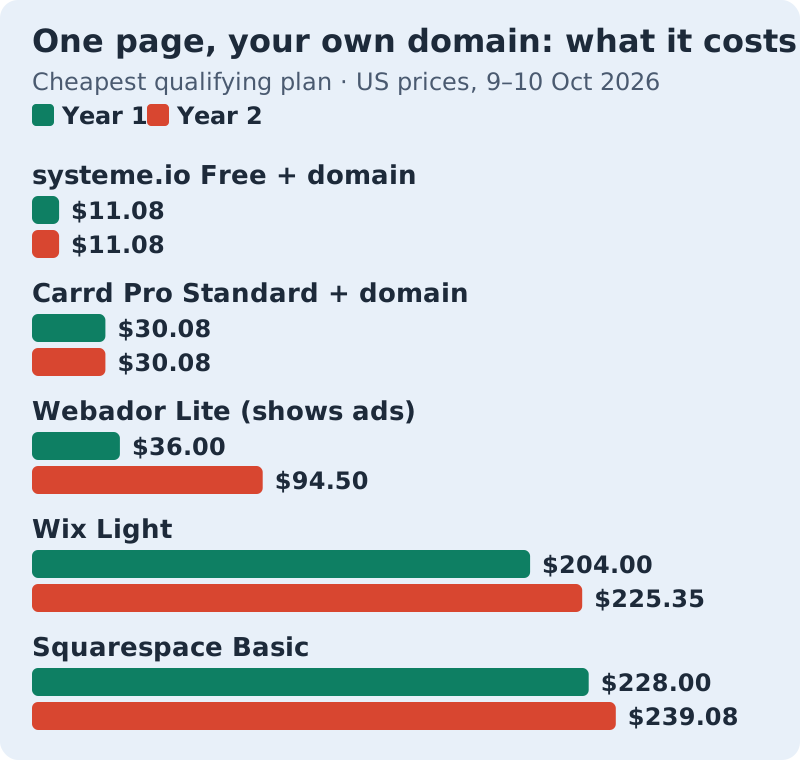
Two patterns stand out. The single-purpose tools, Carrd and systeme.io, cost the same in year two as in year one. Wix and Squarespace cost roughly seven times what Carrd does in year one, and Webador's bill more than doubles once the introductory year ends. That gap buys you something real (the ability to add pages, a store, a blog), so it is only wasted money if your site is going to stay one page.
How easy each one is
Ease is about the decisions a builder makes you take, not about features. The chart shows each ranked builder's score from our easiest-builders ranking, which grades documented setup flows and editor models; systeme.io isn't scored there.
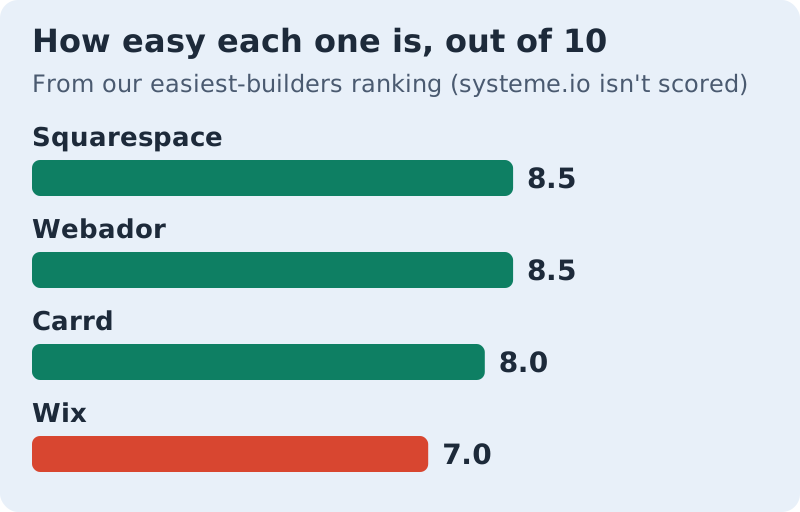
Why does Carrd rank first here with a lower score than Squarespace and Webador? Because those scores measure building a whole site. For a single page, Carrd's blank canvas stays small, and it costs a fraction of the others. Squarespace and Webador win if the page might grow.
One page or several?
Most people who search for a one-page builder are right to. A single page covers a profile, a link-in-bio, a local business with one service, an event or a portfolio of a few pieces. It stops working when the content keeps growing.
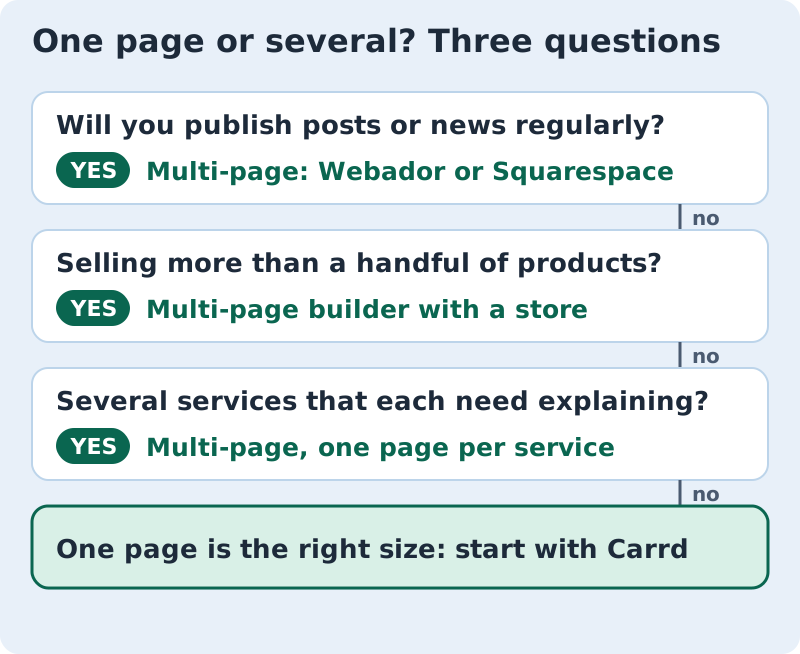
If you land on multi-page, you don't lose anything by having read this far. Squarespace and Webador above are both happy to start with one page and grow. Our guide to the best drag-and-drop website builders compares the multi-page editors in more depth.
Also considered (unranked)
These tools came up in our research, and each has a real use, but none beat the five above for a simple one-page site. We list them without a rank.
Mixo generates a one-page site from a short prompt. It is quick for testing an idea, but it is aimed at launch pages and we couldn't confirm its current US prices. Dorik is a general builder with a 7-day free trial; its Personal plan was $29 a month or $249 a year when we checked its pricing page on 10 Oct 2026, far more than Carrd for one page. Ucraft offers a free plan of up to 15 pages that carries Ucraft branding; its pricing page didn't make clear which plans connect your own domain, so check before you build. Framer is a design tool first, excellent for people who think like designers and more than most one-page owners need; we couldn't confirm its US prices either, so we don't quote them.
Edge cases
A few situations change the answer. If you need to take card payments on the page, Carrd's Pro Standard has Stripe, PayPal and Gumroad widgets, while Wix's Light plan can't accept payments at all. If you want your own domain with no builder branding and no ads for the least money, Carrd Pro Standard is the cheapest option we could confirm. Webador Lite shows ads, Carrd's free plan carries a "Made with Carrd" footer, and Wix's free plan shows Wix ads.
If you want to own the files, Carrd's Pro Plus plan ($49 a year) lets you download the site's source files. Wix doesn't let you export a site at all. And if you are leaving Weebly, which is winding down in 67 countries, any of the five can rebuild a one-page site in an afternoon.
Plain answers about one-page website builders
What is the best one-page website builder?
Is there a free one-page website builder?
Is a one-page website bad for SEO?
Can I add more pages later?
How much does a one-page website cost per year?
Wondering how this fits the bigger picture? See the easiest website builders, ranked — or read how we rank easy.