Carrd Pricing & Review 2026: Which Pro Plan You Actually Need
Carrd costs nothing to start, and $19 a year once you want a site on your own domain with a working contact form. That is the whole answer to "how much is Carrd" for most people: the free plan for practice, Pro Standard at $19 a year for the real thing, and Pro Lite ($9) or Pro Plus ($49) only if your site is unusually small or unusually demanding. All three Pro plans are priced per year, not per month, as of 10 Oct 2026.
So who is this for? Anyone whose website is really one good page: a link-in-bio, a profile, a small business card site, an event. Skip Carrd if you already know you need a blog, a shop with a real catalogue, or several pages of services. As always on this site, there are no stopwatch tests here; everything below comes from Carrd's own plan documentation and pricing page, read on 10 Oct 2026, and from the 2026 reviewer consensus.
A correction, up front. Earlier versions of this review said forms, widgets and embeds needed Pro Plus at $49 a year. Carrd's plan documentation says they come with Pro Standard at $19. We have fixed it everywhere below.
Carrd pricing in one table
Carrd sells three Pro plans, all billed yearly and upfront. There is no monthly price. The table shows the standard version of each plan, with the site count Carrd lists on its plans page.
| Plan | Price | Sites | Own domain | Forms, widgets, embeds | What else it adds |
|---|---|---|---|---|---|
| Free | $0 | Up to 3 | No | No | Core features, "Made with Carrd" footer |
| Pro Lite | $9 a year | 3 | No | No | No branding, video uploads, slideshows, premium templates |
| Pro Standard | $19 a year | 10 | Yes, with SSL | Yes: contact and signup forms, Stripe, PayPal and Gumroad widgets | Analytics, meta tags, local fonts |
| Pro Plus | $49 a year | 25 | Yes, with SSL | Yes, plus advanced forms | Redirects, password protection, site download |
If you run more sites than the standard plans allow, Carrd's Pro page lists larger versions of each tier, still priced per year. Pro Lite comes in 10-site ($14) and 25-site ($29) versions. Pro Standard steps up from 25 sites ($39) through 50 ($69), 100 ($119), 250 ($249) and 500 ($399) to 1,000 sites ($599). Pro Plus runs from 50 sites ($89) to 1,000 sites ($999). Few people reading this need any of that, but it matters if you build pages for clients.
Before paying anything, you can try Pro for seven days. Carrd's trial documentation says it needs "no payment or credit card information", and the trial switches on custom domains, forms, advanced forms and widgets so you can test the features you would actually be buying.
Affiliate link. We may earn a commission — it never moves a ranking.
Which plan your site needs, by job
Plans are easier to choose when you start from the job the page has to do. Here is how the common one-page jobs map onto Carrd's tiers.
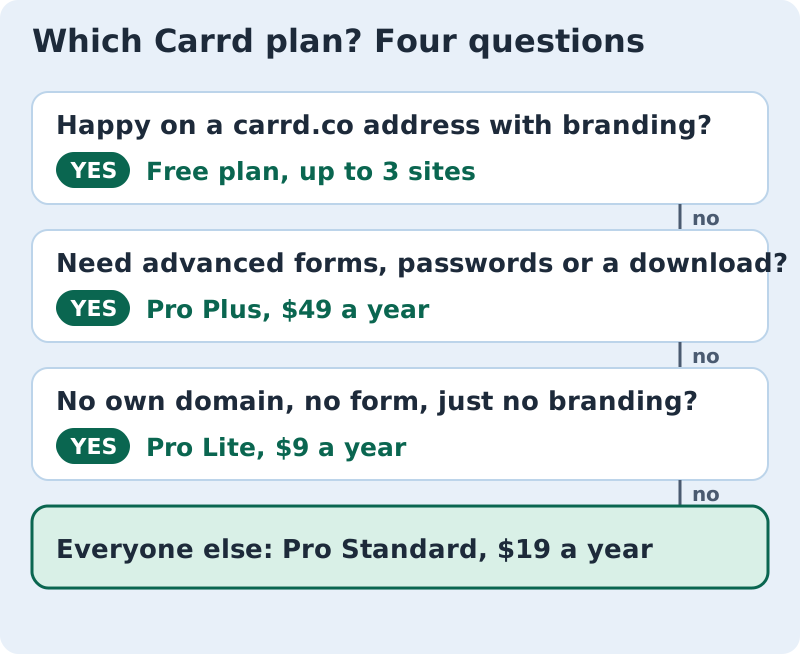
- A link-in-bio for your social profiles: the free plan is fine. Pay $9 for Pro Lite only if the "Made with Carrd" footer bothers you.
- A personal profile or CV page on yourname.com: Pro Standard, $19 a year, because Pro Lite cannot connect a domain.
- A small business page with a contact or newsletter signup form: Pro Standard. Forms, email-marketing integrations and analytics all start there.
- A page that sells one thing: Pro Standard covers Stripe, PayPal and Gumroad widgets. Pro Plus adds Stripe Checkout payments inside its advanced forms.
- Pages you build for clients or several projects: Pro Standard's 10 sites, or one of the larger site-count versions.
Pro Plus earns its $49 in a narrower set of cases: you want forms that feed Zapier-style automations or custom fields, you need password-protected pages or redirects, or you want to download your site's source files. If none of those phrases mean anything to you, you don't need Pro Plus.
The custom-domain gotcha (and the forms line we fixed)
The one trap in Carrd's pricing hasn't changed: the cheapest paid plan does not include a custom domain. Pro Lite at $9 a year removes the branding and unlocks extras, but your page still lives on a Carrd web address. Carrd's custom-domain guide says plainly that it "requires Pro Standard or higher". So $19, not $9, is the real price of a Carrd site with your own name on it.
There is a second cost people miss. Carrd doesn't sell domains. Its guide says the domain "must be registered before you can use it on Carrd", and points to providers such as Cloudflare, Namecheap and Porkbun. A .com from Porkbun was listed at $11.08 a year on 10 Oct 2026, so a realistic first-year budget for a Carrd site on your own .com is around $30.
And the correction we flagged at the top: the contact form most small sites need is not a $49 feature. Pro Standard includes contact and signup forms with many email-marketing integrations. Pro Plus adds advanced forms, which is a different, more technical thing. If an older guide told you a form means paying $49, it was out of date.
What three years of Carrd costs next to a multi-page builder
People weighing Carrd are usually also looking at an all-in-one builder that bundles the domain. So we priced the same thing three ways: one site on your own domain, paid for three years, using US prices read on 9–10 Oct 2026.
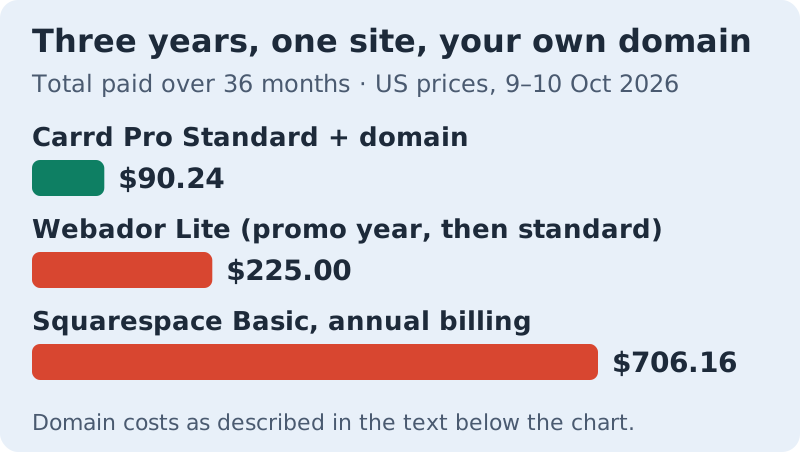
How the totals work. Carrd is $19 a year for Pro Standard plus $11.08 a year for the domain, so $90.24 over three years. Webador Lite is $3 a month for the first 12 months under an offer that ends on 31 Oct 2026, then $6 a month, with the domain free in year one and $22.50 a year after that: $225.00. Squarespace Basic costs $19 a month, billed annually, and includes the domain free for year one; we added the same $11.08 registrar domain from year two because Squarespace's own .com renewal price wasn't shown, which gives $706.16.
The more useful point is the shape of the bill. Carrd's price is the same every year, with no introductory rate to lose. Webador's year two costs more than double its year one. And Webador Lite shows ads on your site according to its pricing page, so it isn't a like-for-like swap for a branding-free Carrd page. None of this makes Carrd better at multi-page sites. It means that if one page does the job, nothing on this list comes close on price.
Affiliate link. We may earn a commission — it never moves a ranking.
The one-page philosophy
Every decision a website asks of you multiplies by its page count: navigation, layout per page, what goes where, what links to what. Carrd deletes the multiplication. One page, scrolling top to bottom, with sections instead of pages: who you are, what you do, how to reach you. Done.
That is why one-pagers are quietly the easiest sites to make well. There is no navigation to design, because there is no navigating. An unfinished five-page site nags at you; a finished one-page site is finished. For a lot of people, the smaller ambition is the one that actually ships.
The honest caveat is that Carrd is a blanker canvas than the wizards. Jimdo builds a whole site from a question-and-answer setup (our Jimdo review covers it), and Site123 walks you through three fixed steps. Carrd hands you a template and then it is your show: you pick the sections, set the order and place the photos. On one page those decisions stay small, but if you want a builder that decides everything, a wizard suits you better.
When you need more than one page
The line is content that grows. A blog needs pages. A shop with more than a couple of products needs pages. A business with several services, each worth explaining properly, will eventually want pages. Carrd cannot follow you there; one page per site is a hard limit, not a starting tier.
Leaving is cheap, though. Your content is a page of text and images you can copy out in minutes, and on Pro Plus you can even download the site's source files. Carrd is one of the few builders where outgrowing it costs you almost nothing.
If you already know you will need pages, start with a multi-page builder instead. Webador's free plan is the natural next stop, and our Webador review covers it, renewal price included. For the whole field ranked side by side, see our easiest website builders ranking.
The no-sweat verdict
Carrd keeps its 8.0. It is the least sweaty website you can own, priced like a sandwich subscription, and the forms correction makes the $19 plan an even better deal than we said before. It loses points only for the Pro Lite domain trap and for asking slightly more of you than the wizards do.
Build your page on the free plan, take the seven-day Pro trial when you are ready to test a domain and a form, and pay the $19 only when the page is worth putting your name on. Start with Carrd's free plan, no card needed.
Plain answers about Carrd pricing
Is Carrd free?
How much is Carrd Pro?
Can I pay for Carrd monthly?
Does Carrd have a free trial of Pro?
Is Carrd Pro worth it?
Wondering how this fits the bigger picture? See the easiest website builders, ranked — or read how we rank easy.