Webador vs Jimdo 2026: Free Plans, Prices and Two-Year Costs
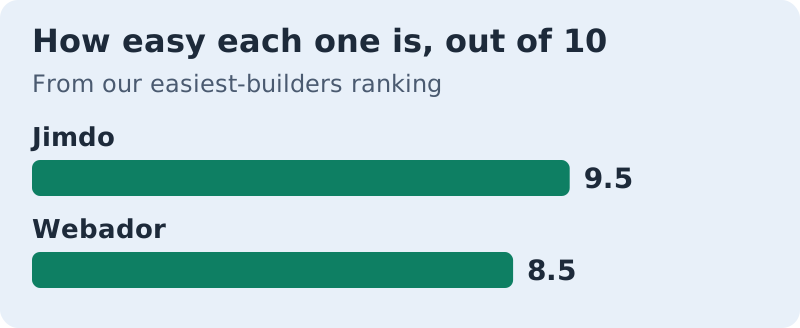
Pick Jimdo if you want the site built for you and a price that stays put: it scores 9.5 for ease, the highest in our ranking, and Start is $11 a month on a 12-month term. Pick Webador if you would rather move things into place yourself and want the cheapest first year: it scores 8.5, and its ad-free Pro plan is $5.25 a month for the first 12 months, then $10.50. Both have free plans, and both are built for beginners.
Who should skip both? Anyone planning a large shop, a content-heavy blog or a design that has to match a brand guide to the pixel. These are calm, simple builders, and their limits are the price of that calm. Prices below are US prices read on 9–10 Oct 2026; there are no timed tests, only each vendor's own pricing pages and our published ease scores.
The verdict: Jimdo builds it, Webador lets you arrange it
The two builders solve the same problem from opposite ends. Jimdo's setup asks you questions about your business and builds a first version of the site from the answers; Tooltester named it the easiest website builder of 2026. You then edit blocks that Jimdo has already arranged. Webador starts you from a template and lets you drag elements around, but everything snaps to a grid, so you can't knock the layout out of line.
That difference decides most cases. If the idea of placing things yourself sounds like work, Jimdo is the better fit. If you want a hand on the layout without the risk of breaking it, Webador is. Our Jimdo review and Webador review cover each editor in more depth.
Free plans and entry plans compared
Most comparisons stop at "both have a free plan". Here is what each free plan blocks, next to the paid plan most people would move to.
| Feature | Webador Free | Jimdo Free | Webador Pro | Jimdo Start |
|---|---|---|---|---|
| Price | $0 | $0 | $5.25 a month for 12 months, then $10.50 | $11 a month on a 12-month term |
| Own domain | No | No, .jimdosite.com address | Free for year 1, then $22.50 a year | Included |
| Ad-free | No | No | Yes | Yes |
| Pages | Unlimited | 5 | Unlimited | 10 |
| Storage | Unlimited | 5 GB | Unlimited | 30 GB |
| Online store | No | Sold as separate store plans | Yes, 10 products, 0% commission | Sold as separate store plans |
| Forms, search bar, custom code | No | Contact forms (1 Smart Form); no search bar or custom code listed | Yes | Contact forms; no search bar or custom code listed |
| No | No | 1 mailbox | 1 forwarding address | |
| Support | Dedicated support team | None | Dedicated support team | Replies within 1–2 workdays |
Two things stand out. Webador's free plan is roomier: unlimited pages, storage and traffic, subject to its fair-use policy, against Jimdo's five pages and 5 GB. But Jimdo's free plan is the one you can outgrow in a straight line, because Start keeps the same editor and adds a domain, ten pages and no ads. On Webador, the cheapest paid plan, Lite, adds a domain but still shows Webador ads, and the forms, search bar and custom code only arrive with Pro.
Paid plans: first year vs standard price
Webador's prices come in two layers. Under an offer that ends on 31 Oct 2026, the first 12 months cost half the standard rate on annual payment: Lite $3 then $6 a month, Pro $5.25 then $10.50, and Business $10.50 then $21. Every paid plan includes a domain free for the first year, which then costs $22.50 a year. Business adds unlimited store products, digital products, services and Google tools such as Search Console.
Jimdo publishes one layer: Start at $11 a month and Grow at $17 a month, both on a 12-month term. Grow raises the page limit to 50, storage to 50 GB, and support replies to within 24 hours, with five forwarding addresses. Jimdo says you can also pay monthly or for a 24-month term, and that prices on those terms may vary. Its pricing page lists an Unlimited plan at $49.50 a month too, but the page contradicts itself on what that plan includes, so we leave it out.
Webador vs Jimdo over 24 months
A first-year price tells you little about a builder you plan to keep. So we added up two years of each plan, including Webador's domain renewal, using the prices above.
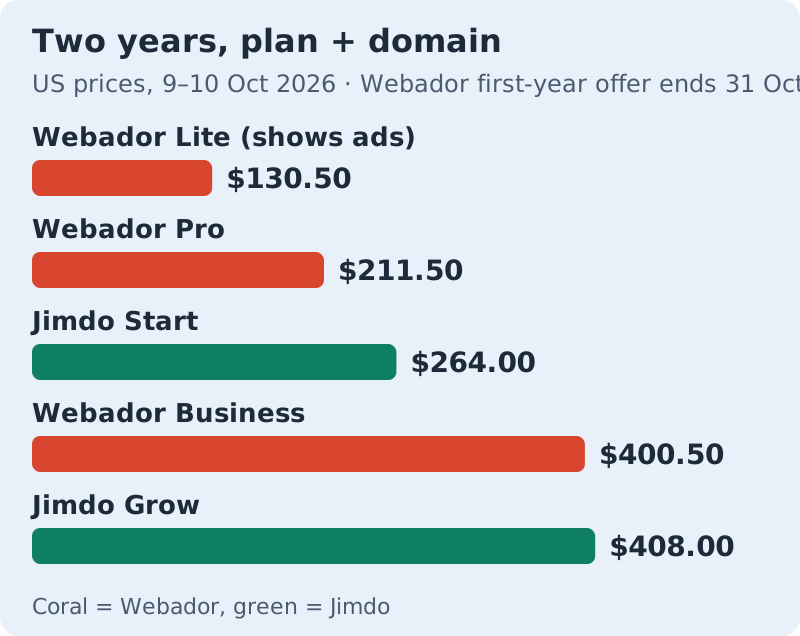
How the totals work. Webador Lite is 12 months at $3 plus 12 at $6, plus $22.50 for the domain in year two: $130.50. Pro is 12 at $5.25 plus 12 at $10.50, plus the domain: $211.50. Business comes to $400.50 the same way. Jimdo assumes the 12-month price holds at renewal: Start is $264.00 and Grow is $408.00 over two years.
So Webador is cheaper over two years at every comparable level, and the gap is widest at entry level. If you buy after 31 Oct 2026, when the first-year discount is due to end, Webador Pro would cost $10.50 a month from the start, or $274.50 over 24 months with the domain, which is slightly more than Jimdo Start. Check both pricing pages on the day you buy.
Affiliate links. We may earn a commission — it never moves a ranking.
Editors: grid-snap drag vs AI-built blocks
Webador's editor is a drag-and-drop editor with guard rails. You pick up a photo, a text box or a button and drop it, and it lands in a slot on a grid. Elements line up on their own and stay in line on phones. You decide the layout, but you can't make it messy.
Jimdo's approach removes even that decision. Its setup builds the pages from your answers, and editing means changing the content of blocks that Jimdo has arranged, or adding new pre-designed blocks. Jimdo's pricing page also describes its Creator editor, which adds coding features for customising navigation, stores and design, for people who want more control. The trade-off is a few quirks that reviewers report, such as no Ctrl+Z undo.
Where each one stops
Both builders run out of road in similar places. Neither is built for a big catalogue: Webador's Pro store stops at 10 products, and Business is its only unlimited plan, while Jimdo sells shops as separate plans whose prices we didn't verify. Neither suits a design that must be pixel-exact, because both deliberately limit where things can go.
The differences are in the details. Webador keeps blogging, unlimited pages and storage on every plan, including the free one, and saves visitor statistics, forms and custom code for Pro. Jimdo puts advanced SEO settings on Start and Grow, but caps pages at 10 and 50, which matters if you plan to publish regularly. If you are likely to outgrow both, choose the one whose limits you will hit last.
Which one should you choose?
The shortest route to an answer is to ask what you want to do with your hands.
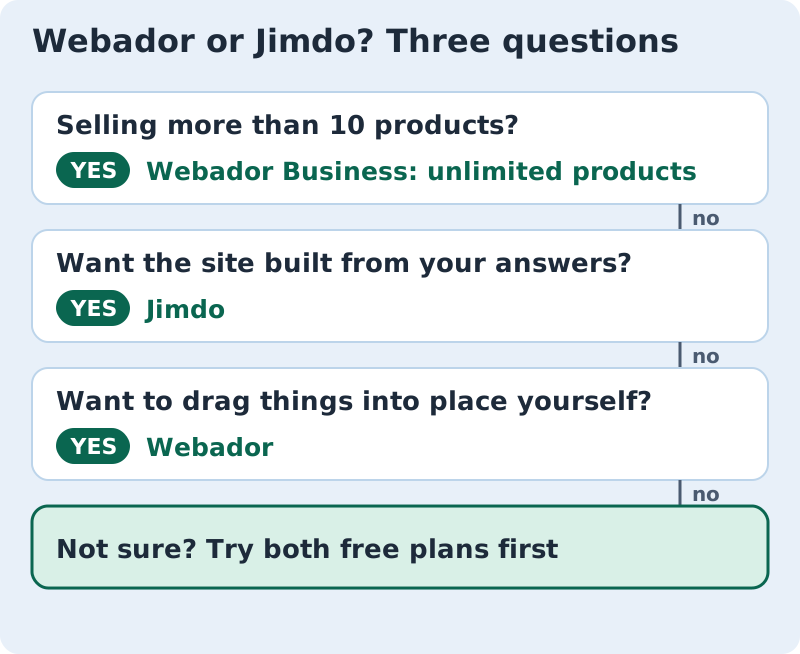
If you are still unsure, both free plans cost nothing and need no commitment. Build the same homepage on each and keep the one that felt calmer. Start on Webador's free plan or try Jimdo free; for the rest of the field, see our easiest website builders ranking.
Edge cases
If you are buying close to 31 Oct 2026, recheck Webador's pricing on the day: the 50% first-year offer has a stated end date, and the two-year maths changes if it ends. If you cancel Webador, note its terms: monthly plans need a month's notice, and annual plans renew automatically unless you cancel at least a month before renewal.
If you want to sell services or digital downloads, Webador's feature table puts both on Business only. If you need more than ten pages on a budget, Jimdo Start won't do, while every Webador plan has unlimited pages. And if you need your site to show no builder ads at the lowest cost, Webador Pro is the cheapest ad-free plan of the two in year one, at $5.25 a month.
Plain answers about Webador and Jimdo
Is Webador free?
Is Webador a good free website builder?
Does Webador take a fee on transactions?
How much is Jimdo?
Which is cheaper, Webador or Jimdo?
Wondering how this fits the bigger picture? See the easiest website builders, ranked — or read how we rank easy.